UNITED STATES—VHS tapes were once the main way people recorded and watched videos at home. Today, many of these tapes are old and hard to play. VHS to DVD converters help transfer video from those tapes onto DVDs, making them easier to watch, store, and share.
These converters usually work by connecting a VCR to a DVD recorder or a computer. They capture the video signal from the tape and save it digitally. This lets you preserve old memories without needing a VCR every time.
When looking for a VHS to DVD converter, the important things to check are ease of use, connection options, and video quality. Some devices offer simple plug-and-play setups, while others give more control over the process. Choosing one with clear instructions and reliable performance will make the transfer smoother. I tested several converters to find the ones that balance these features well.
Best VHS to DVD Converters
- iMemories SafeShip Kit
- Corel Roxio Easy VHS to DVD 3 Plus
- Panasonic VHS to DVD Recorder
- KOHO VHS to DVD Converter
- Portta VHS Converter
- DigitPro VHS to Digital Converter
- Clariviews VHS to DVD Converter
I’ve tested several VHS to DVD converters to find the ones that work best for preserving old tapes. These products offer easy setup, good video quality, and reliable performance to help you save your memories. Below is my list of the top options.
1. iMemories SafeShip Kit

This kit is a reliable choice if you want to safely send your old films and tapes for conversion and get digital files back without hassle.
Pros
- Strong, crush-proof box keeps tapes safe in shipping
- AI tech improves video quality better than expected
- Easy-to-use app for streaming and sharing movies
Cons
- Can be expensive if you have many tapes to convert
- Video quality varies depending on original tape condition
- You have to wait a few weeks for the return of digitized files
I used the SafeShip Kit to send my family’s old VHS tapes for conversion. The packaging was very sturdy, so I wasn’t worried about damage during shipping. It felt good knowing everything arrived safely and on time.
When I got the digital videos back, I noticed the AI-enhanced colors and details made some of the older footage clearer. The app they provide made watching and sharing movies on my phone and TV simple without messing with cables or extra software.
The cost adds up if you have many tapes, so it’s best for those with a moderate collection. I also think some videos could be sharper, but that depends on how well the original tapes were preserved. Overall, it’s a convenient solution that protects your memories and modernizes them for easy viewing.
2. Corel Roxio Easy VHS to DVD 3 Plus
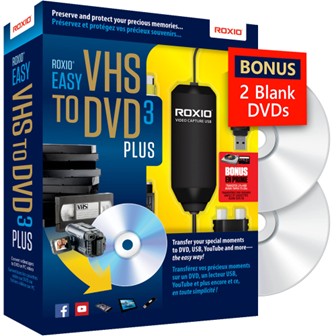
This converter is solid for moving old tapes to digital, but it can require patience during setup.
Pros
- Converts VHS to DVD or digital easily
- Offers tools for video cleanup and editing
- Includes bonus DVDs for first projects
Cons
- Installation can be tricky, especially on Windows 11
- Requires extra cables and a DVD burner to complete the process
- Video quality sometimes shows distortion
When I used Roxio Easy VHS to DVD, I found it handled the conversion steps clearly. The software guides you through capturing the video and burning DVDs or saving digital files. I liked that it includes editing features, like trimming and color fixes, which helped improve some old footage.
It took me a few tries to get everything running smoothly, mainly because the installation wasn’t very straightforward. Plus, you need to have a DVD burner and RCA cables on hand since they’re not part of the package.
Overall, it does bring your old tapes back to life in a format you can watch easily on modern devices. Just be ready for some setup hassle and mixed video quality on certain tapes.
3. Panasonic VHS to DVD Recorder
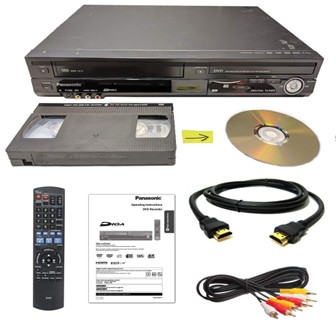
This device works well if you want a simple way to convert VHS tapes to DVD without extra software or computers.
Pros
- Easy one-button transfer from VHS to DVD
- Comes with everything needed to start right away
- Plays DVDs upconverted to HD via HDMI
Cons
- Picture quality from VHS is not very sharp
- Fan stays on even when powered off
- Remote control issues reported by some users
Using the Panasonic recorder was straightforward. I liked pressing one button to start copying my old tapes. It saved me the trouble of sending tapes away or using a complicated process on my computer.
The device included a remote, cables, and even blank DVDs, so I didn’t have to buy anything extra to start recording. Watching the converted DVDs with upscaled HD made some tapes look better than normal.
On the downside, the VHS playback picture isn’t very clear, which is expected with old tape quality. The fan stayed on loud even when I turned the player off, which can be annoying. Also, a few users said the remote sometimes fails or is missing, so double-check the package.
4. KOHO VHS to DVD Converter
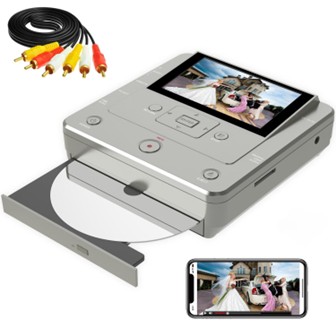
This KOHO converter is a solid choice if you want an easy way to copy VHS tapes to DVD without needing a PC.
Pros
- One-touch recording with clear previews on the built-in screen
- Works wirelessly with a free app for quick transfers from phones
- Comes with DVDs and cables, ready to use right away
Cons
- Needs an external VHS player or DVD player; not included
- Took some time to figure out the setup and disc handling
- Small LCD can feel limited for detailed editing
Using the KOHO, I found it straightforward to connect my old VHS player through the AV cable. Watching the video preview on the small screen before burning saved me time and avoided errors. Also, the 1080p HDMI output made watching the final DVDs on my TV look much better than expected.
The wireless app was surprisingly handy. I used it to move phone videos right onto DVDs without plugging in any cables. That made digitizing a mix of formats simple and fast, especially when copying between USB and SD cards.
Still, it’s important to know you have to wait a little after inserting blank discs or else the machine might say “Disc Not Ready.” It wasn’t instant for me, but once I got the hang of it, the copying process was smooth. The device is lightweight and feels durable enough to use often.
Overall, I liked how this converter packed multiple options in one with decent speed and picture quality. It’s helpful for saving old memories or making gifts without much tech hassle.
5. Portta VHS Converter
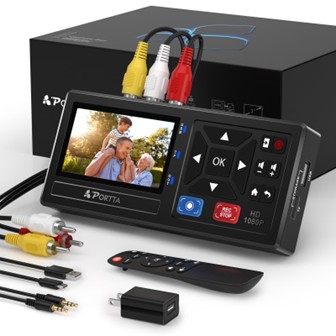
This converter makes it simple to turn old tapes into digital files without needing a computer.
Pros
- Easy to use with plug-and-play setup
- Can store videos on USB or SD card directly
- Supports many devices, from VHS to gaming consoles
Cons
- Cannot play tapes on its own, just converts
- USB drives with high power needs may require extra power
- Small built-in screen is helpful but not very detailed
When I plugged in my old VHS player, the setup was quick and straightforward. I liked that I didn’t have to connect to a PC or install software. The remote control was handy for recording and playing back on the small screen.
The video quality was good, close to what I expected from the original tapes. It kept both the picture and sound clear. Being able to save files as MP4 made it easy to watch them on other devices later.
It was a bit disappointing that the device doesn’t play tapes alone, so you need a separate player. Also, if you use a large USB drive, it might need its own power source to work right. Overall, this converter did exactly what I needed for preserving old memories.
6. DigitPro VHS to Digital Converter
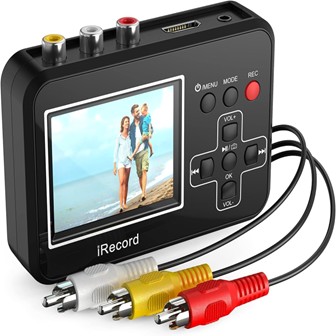
This device is a handy tool if you want a simple way to convert old tapes without using a computer.
Pros
- Easy to use with no software needed
- Portable with built-in screen and battery
- Supports many video sources like VHS, camcorders, and gaming systems
Cons
- Can freeze using some SD cards
- Limited recording time based on memory card size
- Video quality depends on original source; not HD
I tried this converter on some old family VHS tapes, and it worked well with a simple one-button start. The small screen helped me check the video right after recording, which was really convenient for quick transfers on the go.
The built-in battery made it easy to move around without being tied to a power outlet. I connected my old camcorder and even a gaming console without trouble. Setup was straightforward thanks to the AV and RCA connectors.
However, I noticed it could freeze if the memory card was full or inconsistent, which was frustrating. Also, since it saves to a microSD card, storage space limits how much you can record before needing to transfer files elsewhere. The video quality reflects the old tapes, so don’t expect sharp HD images.
Overall, it’s a decent choice for casual use without extra software or a PC. If you want a simple, portable converter that covers many devices, this DigitPro model fits that need.
7. Clariviews VHS to DVD Converter
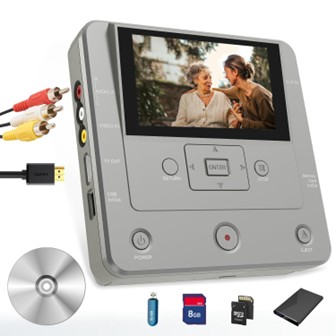
I found this converter easy to use and very flexible for copying videos from different devices to DVDs or USB drives.
Pros
- Supports many source devices like VHS, camcorders, smartphones, and USB drives.
- Transfers files quickly and shows HD output on a big screen.
- Includes a handy app for wireless transfers from phones.
Cons
- It needs RCA cables for some older devices, which might be awkward for some users.
- The converter itself can’t play VHS or DVDs, so you’ll need extra equipment to preview tapes.
- The small screen is good for preview but not as detailed as a full TV display.
This machine worked well for me when moving old family VHS tapes onto DVDs without needing a computer. The setup was straightforward, and the buttons are simple to understand. I liked that it didn’t feel bulky and was easy to carry around.
Using the app to send videos directly from my phone to the DVD was a nice touch and saved me time. I also copied some videos from a USB stick to DVD, and everything stayed clear on my TV.
The only thing I noticed was having to connect RCA cables for some older VCRs, which required a bit of patience. But once set up, the video quality impressed me, especially on a large screen thanks to 1080p output.
If you want a versatile, no-fuss way to save your old videos and files, this device worked well in my experience.
Buying Guide
When I shop for a VHS to DVD converter, I focus on a few key features. These features help me find a device that is easy to use and works well.
The first thing I look for is the video quality. A good converter should keep the video clear and stable when moving from VHS to DVD. Some converters offer options to improve the image like noise reduction or color adjustment.
Next, I check the connection types. I make sure the converter supports the inputs my VHS player uses, usually RCA or S-Video. Also, I look for USB or HDMI outputs to connect to my computer or TV easily.
The software compatibility is important for me too. The converter should work with my computer’s operating system and come with user-friendly software to convert and edit videos.
I also think about how fast the conversion happens. Some devices convert in real-time, while others might take longer, which can be frustrating if you have many tapes.
Price is a factor, but I focus more on features and quality than just cost. A cheap converter might not save your videos properly, which means losing memories.
| Feature | Why It Matters | What I Look For |
| Video Quality | Keeps videos clear and watchable | Noise reduction, color control |
| Connection Types | Works with your VHS player and devices | RCA, S-Video, USB, HDMI |
| Software | Easy to use on your computer | Compatible and simple |
| Conversion Speed | Saves time when converting many tapes | Real-time or fast processing |
These points help me pick the best VHS to DVD converter for my needs.